
Strong iOS developer interview questions test how a candidate manages memory and reference cycles under ARC, and how they choose between UIKit and SwiftUI for a given screen. They also probe how a candidate reasons about concurrency with Swift’s structured async model and handles an actual App Store rejection. Trivia about syntax or keyword definitions filters for people who read documentation recently, not people who ship stable apps. A 90-minute session covering language fundamentals, architecture, concurrency, and release process reveals far more than a whiteboard coding puzzle ever will.
- 01How to Structure the Interview
- 02Swift Language and Memory Management Questions
- 03UIKit, SwiftUI, and Architecture Questions
- 04Concurrency, Networking, and Performance Questions
- 05Testing, CI/CD, and App Store Release Questions
- 06Debugging and Production Incident Questions
- 07Communication and Team Fit
- 08Frequently Asked Questions
An iOS interview usually breaks in one of two directions. It either stays at the syntax level, quizzing a candidate on the difference between weak and unowned as if that were the whole job. Or it drags on for two hours of open-ended architecture talk with no scenario grounding it. Neither approach tells you whether the person can ship a stable app that survives App Store review, real device fragmentation, and a production crash at 11pm. The questions below are grouped so you can build a 90-minute session that actually predicts on-the-job performance.
What Makes iOS Interviews Different
iOS development carries constraints most backend and web roles don’t share. Apple controls the release pipeline, and memory mistakes surface as crashes rather than slow leaks. Every UI decision also has to work across a wide range of physical screen sizes and iOS versions still in the wild. A candidate who has only ever shipped through an internal TestFlight build to five coworkers answers these questions very differently than one who has pushed a real update through App Store review under a deadline. Once you have finished screening, pair this list with our guide to hiring nearshore iOS developers for the full placement process. Our job description template helps you write the posting that attracts these candidates in the first place.
How to Structure the Interview
Cover four domains in 90 minutes: language and memory fundamentals, UI architecture, concurrency and performance, and release process. Decide the time allocation before the call starts. Architecture discussions have a way of eating the whole session if left unbounded, which leaves no time to ask a single question about App Store rejections or crash triage.
A workable split: 5 minutes of context-setting, 20 minutes on Swift and memory management, 20 minutes on UIKit/SwiftUI and architecture. Follow that with 15 minutes on concurrency and networking, 15 minutes on testing and release process, 10 minutes on a debugging scenario, and 5 minutes for candidate questions. Add 10 minutes to the debugging section if the role owns App Store submissions directly rather than handing that off to a release manager.
Send a short brief 24 to 48 hours ahead describing your app’s minimum supported iOS version and whether the codebase is UIKit, SwiftUI, or a mix of both. Include one real constraint your team deals with, such as supporting an older device tier or a large legacy Objective-C module. Candidates who’ve thought through your specific setup give sharper answers than candidates improvising generic best practices cold. Once you’ve settled on a candidate, check our nearshore iOS salary guide to confirm your offer is competitive for their experience level.
Swift Language and Memory Management Questions
Memory questions are where iOS separates hardest from most other mobile and web stacks. Automatic Reference Counting removes manual allocation but does nothing to stop a retain cycle. A candidate who has never chased one down in a real app tends to answer these questions in the abstract.
weak and unowned references, and describe a real situation where you’d pick one over the other.weak is always optional and safely becomes nil when the referenced object deallocates, while unowned assumes the reference will always be valid and crashes if accessed after deallocation. Gives a concrete example, such as a delegate reference using weak because the delegate’s lifetime isn’t guaranteed, versus a closure capturing self as unowned only when self’s lifetime clearly outlives the closure. Weak answer: Recites the definitions correctly but can’t connect either one to a real retain-cycle scenario they’ve actually debugged.weak self captures. Confirms the fix by repeating the navigation and watching whether the object count returns to baseline. Weak answer: Guesses at a fix (adding weak everywhere) without using Instruments to actually locate which object is being retained.Struct vs Class Semantics
struct instead of a class in a new model type, and when does that choice actually matter for correctness rather than just style?struct for value types like models and data transfer objects, because value semantics prevent unexpected shared mutation across the app. Switches to class only when identity or reference semantics are genuinely needed, such as a shared cache or a view controller. Notes that a struct copied into multiple SwiftUI views won’t share mutations, which is a real correctness bug if the developer assumed reference behavior. Weak answer: Says “structs are faster” as the only reason, without understanding the value-versus-reference semantics that actually drive the decision.Need Pre-Vetted iOS Developers?
Kore BPO surfaces nearshore iOS engineers already screened on questions like these. First candidates in 72 hours.
UIKit, SwiftUI, and Architecture Questions
Production iOS codebases in 2026 are rarely purely one framework or the other. A candidate needs to reason about when SwiftUI genuinely fits and when dropping into UIKit is the more honest answer, not just recite which one Apple is pushing this year.
UIHostingController to embed it inside the existing UIKit navigation stack. Is deliberate about state ownership at the boundary so the two frameworks don’t fight over the same source of truth. Scopes the SwiftUI adoption to genuinely new, self-contained screens rather than partial rewrites of existing UIKit screens. Weak answer: Suggests rewriting the whole app in SwiftUI as the “right” long-term answer without acknowledging the cost and risk of a full rewrite on a live product.onAppear or button action with no separation from presentation logic.SwiftUI Re-render and Performance
@ObservedObject or @State property is changing more often than the view actually needs to reflect. Looks for a large struct being passed down that causes the whole view tree to invalidate on any single field change. Considers splitting the view into smaller subviews or using Equatable conformance to reduce unnecessary diffing. Weak answer: Doesn’t know SwiftUI has a re-render cost at all, or assumes the framework “just handles” performance automatically with no developer responsibility.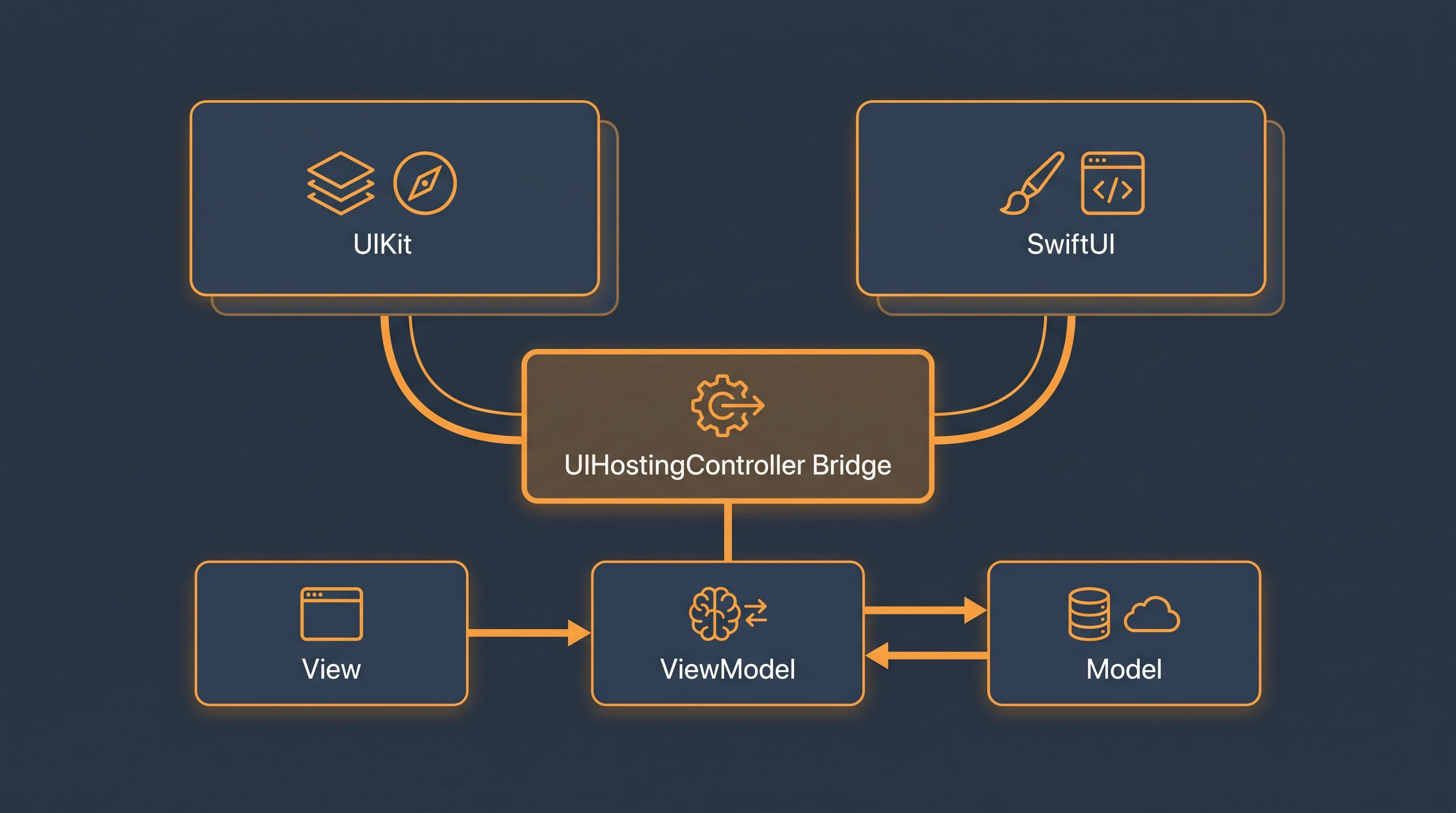
Concurrency, Networking, and Performance Questions
Swift’s structured concurrency model (async/await, actors, Task) replaced a lot of manual GCD juggling, but it introduced its own failure modes. Candidates who only worked with completion handlers historically answer these differently than candidates who’ve shipped with async/await in production.
actor so access is automatically serialized, rather than manually managing locks or dispatch queues for every access point. Mentions that intermittent, non-reproducible crashes are a classic signature of a race condition rather than a deterministic logic bug. Weak answer: Suggests adding a delay or retry logic to “make it more reliable” without identifying the actual race condition.async let or a task group, then awaiting all three results together instead of sequentially. This cuts the wall-clock time down to roughly the slowest single call instead of the sum of all three. Notes the difference between async let for a known, fixed number of concurrent tasks versus a task group for a dynamic number. Weak answer: Doesn’t recognize the calls are independent and proposes a generic “make the network faster” answer instead of restructuring the concurrency.List Performance and Profiling
Testing, CI/CD, and App Store Release Questions
This is the domain most interview panels skip entirely, and it’s the one that determines whether a hire can own a release end to end instead of needing hand-holding through every submission.
CI/CD Pipeline Expectations
Debugging and Production Incident Questions
Crash triage on iOS depends heavily on reading a real crash log and symbolicated stack trace, a skill that’s very different from stepping through code in a debugger during development.
EXC_BAD_ACCESS that only happens on a subset of devices and you can’t reproduce it locally. How do you investigate?
Communication and Team Fit
For nearshore iOS developers specifically, communication questions assess whether the candidate can collaborate in real time with a distributed US team and explain platform constraints to stakeholders who don’t have mobile backgrounds.
Frequently Asked Questions
Format and Screening Approach
Should I ask iOS candidates to whiteboard code during the interview?
A short take-home or paired debugging exercise predicts real performance better than live whiteboard coding. Give the candidate a small Xcode project with an intentional bug, such as a retain cycle or a race condition, and ask them to find and fix it with their own tools and Instruments available. This mirrors the actual job far more closely than reciting an algorithm from memory under interview pressure with no IDE support.
How important is Objective-C experience for a modern iOS hire?
It depends entirely on your codebase. If you’re maintaining a legacy app with a significant Objective-C module, ask at least one question about bridging between Swift and Objective-C. If your codebase is pure Swift and has been for years, Objective-C fluency adds little predictive value and shouldn’t be weighted heavily. Most iOS developers entering the field in the last several years have limited hands-on Objective-C experience.
Candidate Quality and Process
How do Kore BPO candidates compare to candidates we would source and screen ourselves?
Kore BPO candidates have already passed a technical screen built on questions similar to those in this guide before they reach your interview stage. You review 2 to 3 vetted profiles instead of sorting through dozens of applicants whose resumes list “iOS development” without evidence of a shipped App Store product. Clients consistently report that 80 to 90% of Kore BPO candidates advance past their first internal round, compared to typical conversion rates of 15 to 25% from open applicant pools for this specialty.
What should I avoid asking in an iOS developer interview?
Avoid pure trivia questions with a single memorized answer, such as reciting every case of a specific enum from a system framework. These filter for recent documentation reading, not production judgment. Also avoid asking a candidate to design an entire app’s architecture from scratch with no constraints given. Real architecture decisions are always shaped by team size, existing codebase, and release cadence, and removing those constraints produces generic textbook answers that don’t predict real performance.
How many interview rounds does an iOS developer role need?
One 90-minute structured technical interview covering the domains in this guide, plus a 30-minute hiring manager conversation, is enough for most nearshore placements. A take-home debugging exercise in place of, not in addition to, live coding adds real signal without adding excessive candidate burden. Reserve a third technical round for senior roles where you need to evaluate architecture decisions at the scale of a full app, such as modularization strategy across multiple feature teams.

Related Articles



HIRE YOUR NEARSHORE iOS DEVELOPER
Get pre-screened candidates from Latin America on your desk within 72 hours. 90-day replacement guarantee on every placement.
GET STARTED TODAYNo upfront fees | 90-day replacement guarantee